What connection does AcmeLink ME use?
It plugs into CN105 on a confirmed Mitsubishi Electric indoor-unit control board. The connection supplies power and communication, so no separate power adapter is required.
AcmeLink VRF Gateway
AcmeLink ME is a CN105 WiFi adapter and smart control gateway for compatible Mitsubishi Electric indoor units. The WiFi version connects to Tuya Smart / Smart Life for app control and supported smart-home scenes. Choose WiFi, Zigbee, Modbus, WiFi + Modbus or Zigbee + Modbus. The compatible CN105 interface supplies power and communication; Modbus configurations add RS485 A/B wires.
CN105 smart control options
Choose AcmeLink ME when your project needs Tuya Smart / Smart Life control on a confirmed compatible Mitsubishi Electric indoor unit. Use supported Tuya devices and scene functions to plan smart-home automation; availability depends on the devices, gateway and selected configuration.
The WiFi version uses a 2.4 GHz network. The separate Zigbee version uses a matched Tuya Zigbee gateway. For a BMS or custom host project, choose Modbus, WiFi + Modbus or Zigbee + Modbus and request the register map and serial settings. WiFi alone does not provide a Modbus BMS interface.
For a Mitsubishi split AC WiFi module or VRF WiFi controller project, confirm the complete indoor-unit model and CN105 interface against the tested list below. The product category or connector name alone does not establish compatibility.
| Original interface reference | Manufacturer documentation | Before choosing AcmeLink ME |
|---|---|---|
| MAC-567IF-E | MELCloud setup documentation | Check the full interface suffix and indoor-unit model. |
| MAC-587IF-E | MELCloud WiFi interface | Compare the required app functions with the Tuya configuration. |
| MAC-597IF-E | MELCloud Home WiFi interface | Confirm whether the project requires MELCloud Home or a Tuya-based alternative. |
| MAC-577IF-E | Manufacturer model documentation | Provide a label photo: MAC-577IF-E and MAC-577IF2-E are distinct references. |
The references above help identify your existing installation. Manufacturer compatibility lists apply to the original interfaces; they are not the AcmeLink ME tested model list. Check the ME tested models below and send your exact indoor-unit model for confirmation.
If your project specifies MAC-567IF-E, MAC-587IF-E, MAC-597IF-E or MAC-577IF-E, send that reference together with the indoor-unit nameplate and required control functions. These are Mitsubishi Electric model references, not AcmeLink ME model numbers or a verified one-for-one replacement list.
AcmeLink ME provides a Tuya-based control route. Do not assume operation with MELCloud, MELCloud Home or every feature of the original interface. Confirm the exact unit, wiring, retained controller and required app/BMS functions before approving a sample. Project pricing depends on configuration and quantity.
Manufacturer references: Mitsubishi Electric MELCloud WiFi interfaces. AcmeLink ME is an ACMELEC aftermarket product; it is not a Mitsubishi Electric-branded interface.
Before choosing a sample, read the Tuya alternative selection guide and CN105 Modbus and BMS integration checklist.
Available ME configurations are WiFi, Zigbee, Modbus, WiFi + Modbus and Zigbee + Modbus. WiFi + Zigbee and WiFi + Zigbee + Modbus are not supported.
| Configuration | Control route to prepare | Additional RS485 wiring |
|---|---|---|
| WiFi | 2.4 GHz WiFi; Tuya Smart / Smart Life | None |
| Zigbee | Tuya Zigbee; confirm the gateway and pairing arrangement | None |
| Modbus | RS485 host or BMS; request the matching register map | A/B |
| WiFi + Modbus | 2.4 GHz WiFi; Tuya Smart / Smart Life | A/B |
| Zigbee + Modbus | Tuya Zigbee; confirm the gateway and pairing arrangement | A/B |
WiFi and Zigbee versions use the same wiring but different Tuya modules. Modbus configurations add two RS485 communication wires, A and B, to the indoor-unit connection. Specify the required configuration before ordering; these options do not mean one supplied unit includes every protocol or can switch between WiFi and Zigbee through a software setting.
For Modbus integration, request the register map and serial communication settings for the ordered configuration. Confirm compatibility with the intended controller or BMS. For a Zigbee order, confirm the required Tuya gateway and pairing arrangement before installation.
Enquire about a configuration: WiFi · Zigbee · Modbus · WiFi + Modbus · Zigbee + Modbus. Your selection will be carried into the enquiry form, where you can change it or ask for advice.
Selection and installation reference
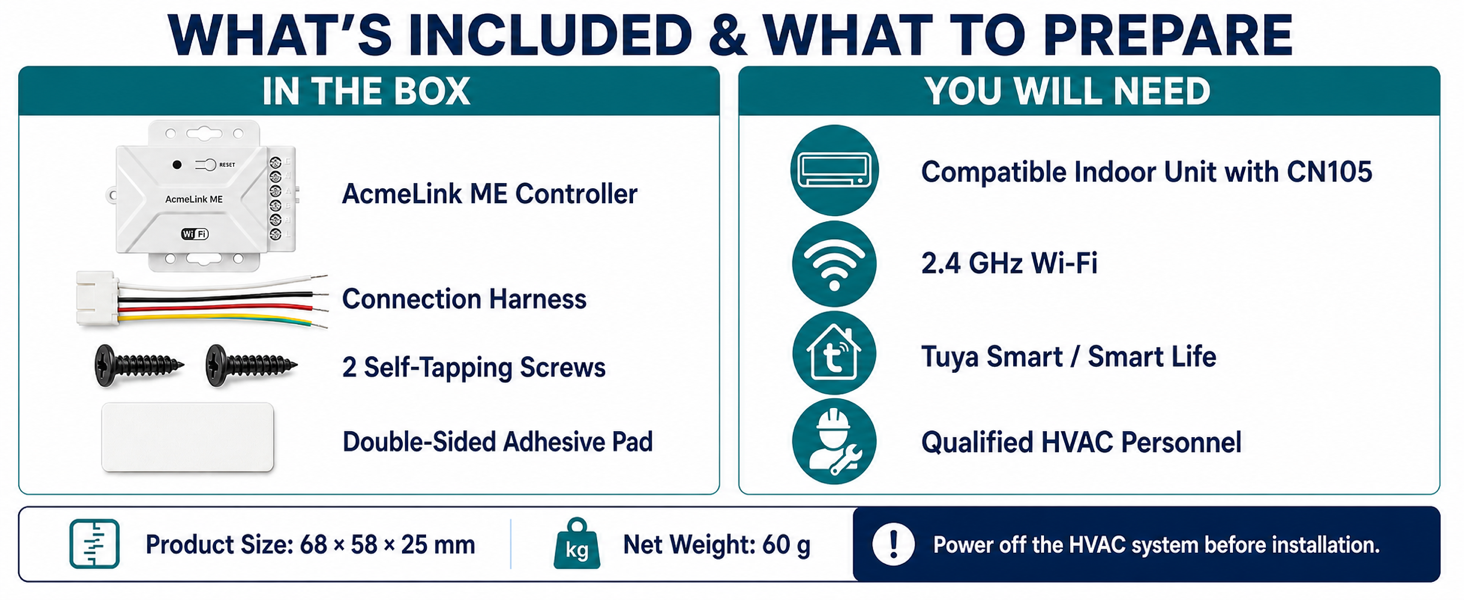
The illustrated standard WiFi package contains an AcmeLink ME controller, connection harness, two self-tapping screws and a double-sided adhesive pad. The product body is 68 × 58 × 25 mm and its net weight is 60 g. Confirm the packing list for the configuration you order.
ME is available as WiFi, Zigbee, Modbus, WiFi + Modbus or Zigbee + Modbus. WiFi + Zigbee and the three-protocol combination are not supported. Compare all five ME configurations and their wiring.
The compatible CN105 connection provides communication and power; no separate power adapter is required for the ME module. The WiFi illustrations do not mean WiFi is included in a Zigbee-only or Modbus-only order.
References: supplied package and preparation panel · ME manual · WiFi setup guide. Protocol combinations and A/B wiring reflect the manufacturer's configuration clarification.
Complete product presentation
The illustrated presentation below shows the WiFi configuration. Review its working principle, compatible indoor units, app functions and installation process; confirm documentation for the Zigbee or Modbus configuration you order.


AcmeLink gateway detail
AcmeLink ME is used for Mitsubishi Electric air conditioner smart control projects where the buyer wants a compact gateway module instead of changing the visible wall thermostat style.
| Target brand | Mitsubishi Electric |
|---|---|
| Physical connection | CN105 port on compatible indoor units |
| Power | Powered through CN105; no separate wall adapter |
| Wireless option | 2.4 GHz WiFi or Zigbee by configuration; none on Modbus-only units |
| App | Tuya Smart / Smart Life for the appropriate wireless configuration; confirm the Zigbee gateway requirement |
| Control functions | Power, mode, temperature, fan speed, schedules and status synchronization |
| Dimensions | 68 x 58 x 25 mm |
| Net weight | 60 g |
| Installation focus | Confirm the complete indoor-unit suffix and CN105 connector before ordering |
Use the exact model notation below when checking the indoor-unit nameplate. Parentheses and suffixes follow the supplied compatibility list.
| Series | Tested model notation |
|---|---|
| PEFY | PEFY-P20/25/32/40/50/63/71/80/100/125/140VMA(L)-(E) |
| PEY | PEY-P18/24/30/36/42/45/48JAG PEY-P60GAG |
| SEZ | SEZ-M25/35/50/60/71DA(L) |
Compatibility testing is complete for the listed models across WiFi, Zigbee, Modbus, WiFi + Modbus and Zigbee + Modbus. Match the complete suffix and CN105 connector. An unlisted model requires a separate review.
AcmeLink ME product video
This 32-second overview shows AcmeLink ME on a compatible Mitsubishi Electric indoor unit. The demonstrated wireless configuration is WiFi; confirm your model and ordered version before installation.
Watch this demonstration on YouTube · Watch the 80-second installation and Tuya setup tutorial
CN105 supplies power and communication on a confirmed compatible indoor unit. No separate power adapter is required. App and voice-control functions depend on the matched unit and configuration.
Professional detail
AcmeLink ME is a Mitsubishi Electric VRF smart gateway module for projects that need app-based or smart platform control without replacing the complete air conditioner control route.
Hidden add-on gateway for Mitsubishi Electric indoor units equipped with CN105.
Selected PEFY, PEY and SEZ models; verify the full suffix and connector before ordering.
Choose WiFi, Zigbee, Modbus, WiFi + Modbus or Zigbee + Modbus. Functions and integration requirements depend on the ordered configuration.
Send the complete indoor-unit model label or a clear CN105 connector photo for confirmation.
CN105 compatibility check
Need a wall-mounted screen for room control? Compare the AE-5507 Mitsubishi Electric thermostat route with the AcmeLink ME gateway. The two product routes require their own model and wiring confirmation.
AcmeLink ME connects to CN105 on a confirmed Mitsubishi Electric indoor unit. The connection carries power and communication. CN105 identifies the connection point; it does not specify whether your ME order uses WiFi, Zigbee or Modbus.
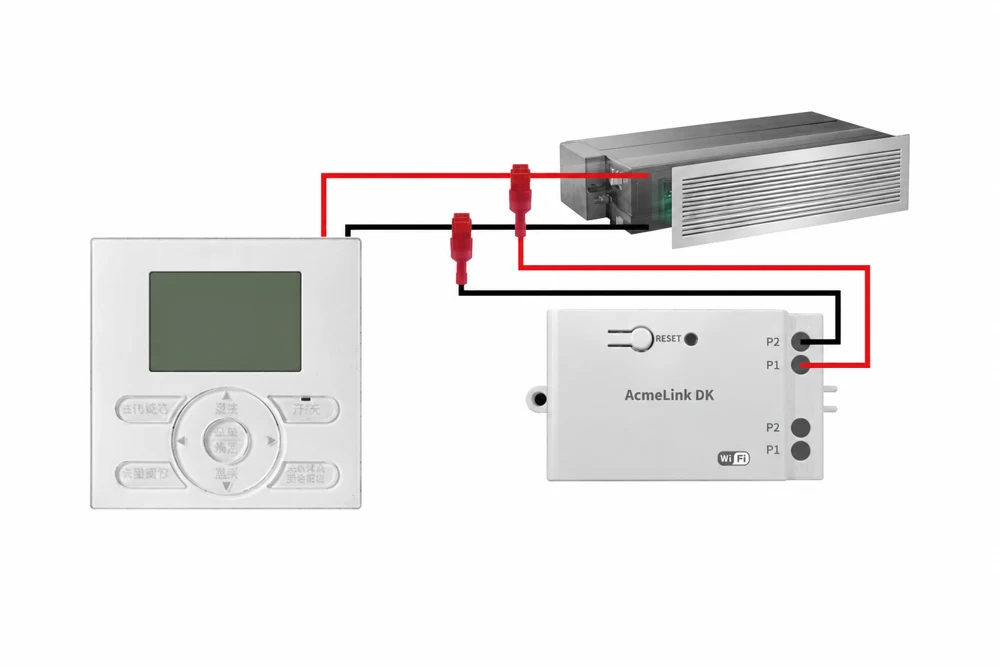
AcmeLink ME is the Mitsubishi Electric model. For Daikin P1/P2 installations, review AcmeLink DK. For a project needing centralized control of multiple indoor units, compare the B19 and B27 gateway architectures before choosing hardware.
Request an AcmeLink ME compatibility reviewApplication details
To speed up quotation, include HVAC brand/model, protocol requirement, order quantity, target market, logo needs and certification requirements.
Open English manualFunction details
AcmeLink ME adds app control while remaining hidden beside the indoor-unit control board.
One plug carries power and communication; no separate wall adapter is required.
Control power, operating mode, target temperature and fan speed through Tuya Smart or Smart Life.
Create schedules and synchronize supported operating status with the app.
Works with supported Tuya integrations such as Alexa, Google Assistant, SmartThings and Yandex.
Technical checklist
Exact configuration depends on project requirement, so ACMELEC confirms the real HVAC system before quotation and sample preparation.
Specification summary
| Model | AcmeLink ME |
|---|---|
| Product family | AcmeLink HVAC Gateway |
| Connection | Mitsubishi Electric CN105 |
| Wireless option | 2.4 GHz WiFi or Zigbee by configuration; none on Modbus-only units |
| Compatible system | Selected Mitsubishi Electric PEFY, PEY and SEZ indoor units |
| App | Tuya Smart / Smart Life for the appropriate wireless configuration; confirm the Zigbee gateway requirement |
| Voice support | Alexa, Google Assistant, SmartThings and Yandex where supported by Tuya |
| Power | From compatible CN105 interface |
| Dimensions | 68 x 58 x 25 mm |
| Net weight | 60 g |
| OEM/ODM | Logo, label, packaging and manual support by project |
Verified product answers
It plugs into CN105 on a confirmed Mitsubishi Electric indoor-unit control board. The connection supplies power and communication, so no separate power adapter is required.
No. ACMELEC has completed testing for the PEFY, PEY and SEZ models and suffixes listed on the ME product page across WiFi, Zigbee, Modbus, WiFi + Modbus and Zigbee + Modbus. Match the full model and connector; other models need a compatibility review.
Use the appropriate Tuya Zigbee gateway and add the ME module as a sub-device. Confirm the gateway model before ordering. WiFi credentials in the illustrated Zigbee instructions configure the WiFi-connected gateway, not the ME Zigbee module.
Yes. A Modbus-only configuration is available, as are WiFi + Modbus and Zigbee + Modbus. Request the matching RS485 A/B wiring, register map and serial settings for your host controller or BMS.
Use the revised ME manual and the step-by-step Tuya guide. Pairing mode is indicated by a flashing green light. For Zigbee, add the module as a sub-device through the appropriate gateway.
The ME product materials describe retaining the original controller on compatible installations. Send the existing controller model and connection details, including anything already occupying CN105, so ACMELEC can confirm the arrangement before ordering.
Explore the range
Samples, MOQ and lead time
Public customer feedback
An Alibaba buyer reported that the adapter worked with their Mitsubishi air conditioner through CN105 and that the instructions were clear.
Source: buyer M***g, platform location Singapore, . Read the public Alibaba product review.
This is an individual buyer report for the linked WiFi-adapter listing, not an independent compatibility test. The review does not provide the complete indoor-unit model or ordered hardware revision, and does not establish Zigbee, Modbus or combined-configuration performance. Confirm the current configuration and exact HVAC model before ordering.
In a separate review dated 29 March 2026, a buyer with the same displayed name reported normal operation and suggested adding hook-and-loop tape for mounting beside the wall unit. These records are not presented as two independent customer projects. Customer photos are not reproduced here.
Manual, video and setup guides
The revised English manual includes both wireless setup routes. Select the instructions for your ordered configuration. The product video demonstrates CN105 connection and smart control. The full tutorial in the Tuya guide also covers WiFi preparation and pairing.
Manual revised 14 September 2026 · 16 pages · approximately 20.2 MB. Specifications: 68 × 58 × 25 mm, net weight 60 g. Pairing mode: green indicator flashing.
For WiFi and WiFi + Modbus configurations. The Bluetooth function described below assists WiFi device discovery; it does not mean Bluetooth is an additional orderable control configuration.
Open manual pages 6-11. App wording may vary by version. If the device is not discovered, check the flashing green indicator, WiFi band, password and phone Bluetooth setting before trying again.
For Zigbee and Zigbee + Modbus configurations. First add the appropriate Tuya Zigbee gateway to the app; then add AcmeLink ME as its sub-device. Confirm the gateway model for your project.
Open manual pages 12-16. Generic reset examples in the app may describe other devices; use the green flashing ME pairing indication stated here.
The wireless setup chapters cover the WiFi or Zigbee part of a combined version. Request the matching RS485 A/B wiring, register map and serial settings for Modbus integration.
Ask about setup or Modbus documentationInstaller and integrator checklist
Use the confirmed indoor-unit model and ordered protocol configuration for the sample test. Record the results below for each installation type; these are project acceptance checks, not a claim that every function is available on every indoor unit.
If a check fails, send the complete model, ME configuration, wiring photos, indicator state and a description of the command and observed response. Request the documentation for the exact configuration; WiFi setup steps do not replace a Modbus register map.
Download the English ME manual · Read the Mitsubishi Electric Tuya WiFi setup guide
International B2B projects
Download the English project enquiry checklist (TXT). Complete the fields for your project and paste them into the enquiry form. Share the nameplate and connector photos when our team follows up.
Installers, HVAC distributors and system integrators can use the same model-checking process across markets. Provide the project details below so the configuration and sample requirements can be reviewed before a quotation.
Use the English product information for general selection and request configuration-specific documents for the intended installation. Price and supply terms are confirmed through B2B quotation.
For Modbus versions, request the register map and serial settings. For Zigbee versions, confirm the gateway and pairing requirements. Certification documentation is confirmed by model and market.
AcmeLink ME is also referred to as AcmeLink_ME. These names refer to this product route; specify the ordered configuration when requesting a sample or quotation.
Compare B19, B27, B25L, ME and DK · Read the matching ME manual
For confirmed Mitsubishi Electric indoor units with CN105. Available configurations are WiFi, Zigbee, Modbus, WiFi + Modbus or Zigbee + Modbus; WiFi + Zigbee is not a listed configuration.
Source: AcmeLink ME WiFi / Zigbee manual. Revised 14 September 2026; 16 pages. The wireless setup guide does not replace the register map and serial settings for a Modbus version.
Page numbers above refer to the PDF viewer. Documentation references checked on . This is a document cross-check, not a new installation test or a change to the supported-model list.
For your order, confirm the complete HVAC model, firmware, interface and required functions. How we handle technical sources and corrections.