AcmeLink series · Single-indoor-unit gateway
AcmeLink B25L Indoor-Unit VRF Gateway
Connect one compatible VRF, VRV or ducted indoor unit to a matched smart-home or host system. B25L combines an 85 × 85 × 28 mm enclosure, RS485 integration and Bluetooth firmware adaptation through a WeChat mini program.
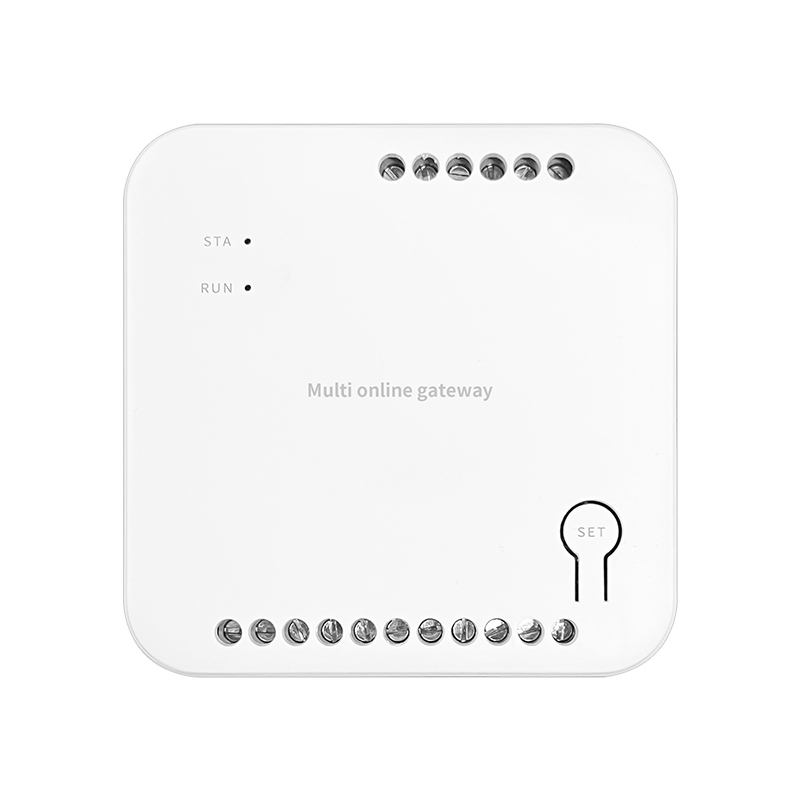
One gateway for each indoor unit
B25L uses the same room-by-room gateway architecture as B27: install one gateway at each indoor unit and connect it to the selected host or smart-home interface. For a project with eight indoor units on this route, plan eight B25L gateways.
The manual also describes wired centralized control. This means coordinating individual gateways through a matched host system. For direct shared-bus control of several indoor units with one gateway, see AcmeLink GW B19.
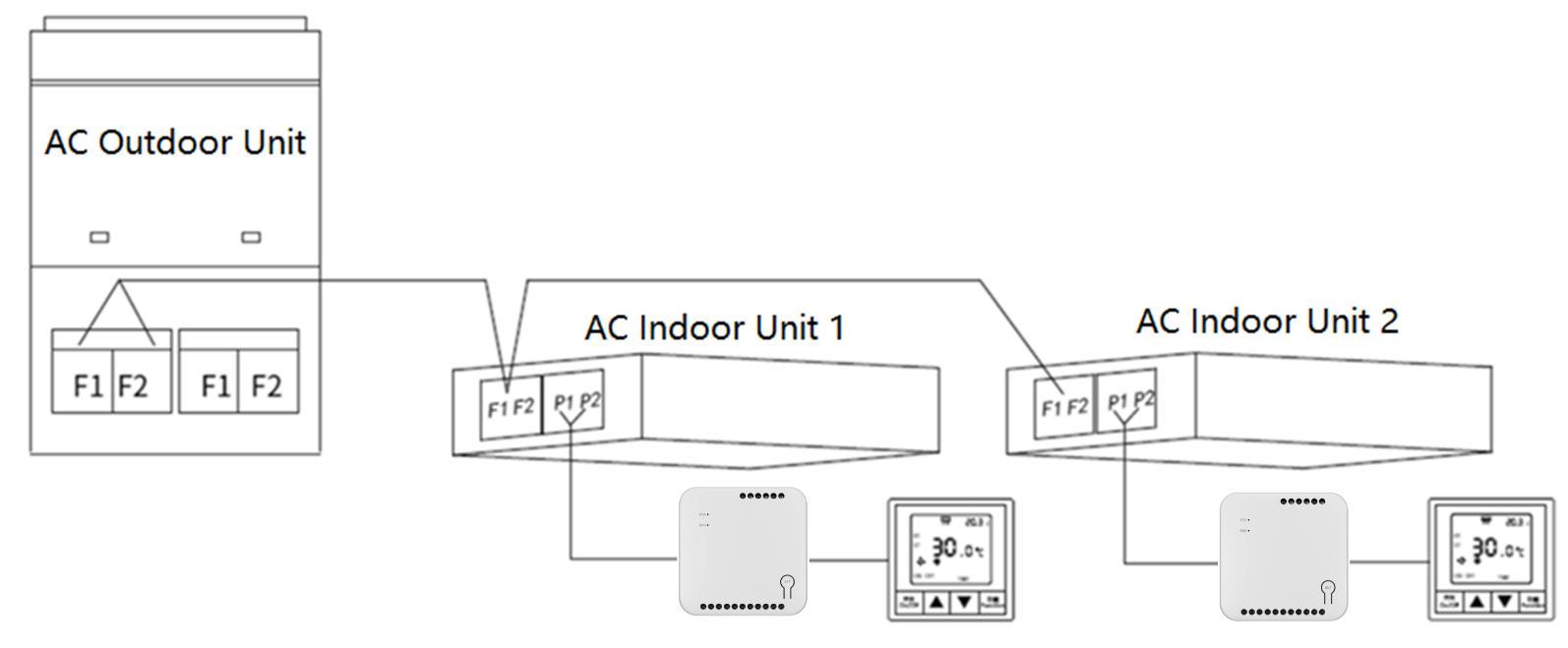
The diagram is an example topology. Use the brand-specific terminals and cables listed for the actual indoor unit.
B25L, B27 or B19: choose the installation architecture
| Selection | B25L | B27 | B19 |
|---|---|---|---|
| Gateway allocation | One per indoor unit | One per indoor unit | One for multiple indoor units on a supported shared bus |
| Dimensions | 85 × 85 × 28 mm | 51 × 53 × 17 mm | 106 × 96 × 57 mm |
| Placement | Indoor-unit service opening or smart-control box | Suitable wall back box or indoor-unit service space | Accessible DIN-rail or control-box installation |
| Selection focus | Square housing, matched indoor-unit interface and host configuration | Smaller housing for tighter installation spaces | System-wide bus topology and device count |
View B27 · View B19. B25L and B27 share the single-unit approach, but use each product’s own terminal and power specifications.
Hardware specifications
| Parameter | B25L specification |
|---|---|
| Model | AcmeLink_B25L |
| Gateway allocation | One gateway per indoor unit |
| Dimensions | 85 × 85 × 28 mm |
| Power source | Compatible air-conditioning indoor unit |
| Average power consumption | 0.5 W |
| Auxiliary panel output | DC 8.5 V, maximum 0.7 W; subtract any built-in third-party module consumption |
| Working environment | −20°C to +60°C; 0–90% RH |
| Installation | Indoor-unit service opening or indoor smart-control box |
| Host integration | RS485 and UART for optional third-party WiFi, Zigbee or BLE modules |
| Firmware upgrade | WeChat mini program over Bluetooth |
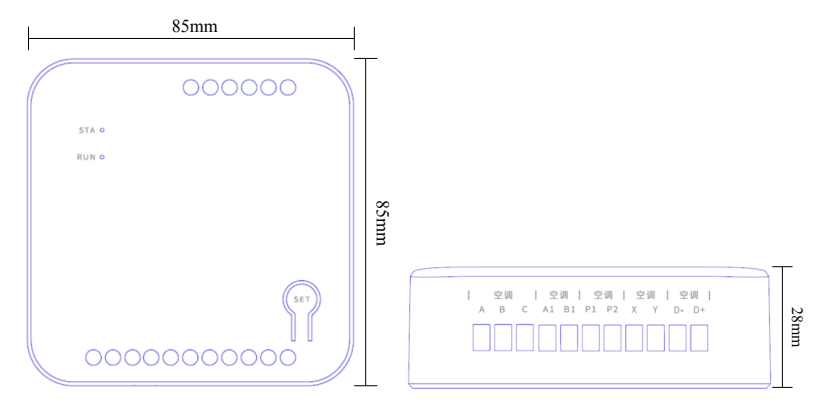
The DC 8.5 V connection is an auxiliary output for a compatible third-party panel, not a mains input. Its maximum 0.7 W power budget is reduced by the consumption of any built-in third-party wireless module.
RS485 and optional wireless integration
The manual describes an RS485 interface and a UART connection for a third-party WiFi, Zigbee or BLE module. Specify the required module, host platform and application protocol before ordering. These are configuration choices, not a claim that all wireless protocols are included in every gateway.
For Modbus or BMS projects, request the application protocol and register documentation for the ordered version. RS485 alone does not establish Modbus compatibility. Bluetooth used for WeChat commissioning is separate from the selected smart-home integration.
A2/B2 provides the compatible third-party panel connection. The SET button works with the fitted wireless module for networking; follow that module’s matching setup instructions.
Original-controller coexistence
B25L can operate independently or coexist with a supported original panel. The manual describes automatic master/slave adaptation without manual setting where the air conditioner itself supports master/slave panels. A compatible third-party panel can also replace the original panel on a supported route.
Coexistence is not universal. The table below includes routes that do not retain the original panel and Hitachi routes with an original infrared-remote exception. Confirm the complete indoor-unit and controller models before commissioning.
Brand and wiring compatibility reference
The following 36 connection routes are transcribed from the supplied B25L manual, V1.0 dated 20 November 2023. They are documented routes, not a claim that every model from these brands has been tested. Match the full model, board connector, cable and firmware before ordering.
On smaller screens, swipe horizontally to read all columns. “Polarity matters” indicates whether the conductor order must be observed. Connector pin count and the cable-core count can differ; both are retained from the manual.
| Brand / system | Gateway terminals | Indoor-unit connector | Polarity matters | Cable cores | Original controller coexistence | Special communication cable |
|---|---|---|---|---|---|---|
| Daikin MX ducted (4-core) | A1, B1, D−, D+ | S21 | Yes | 4 | No | Yes |
| Daikin VRV (2-core) | P1, P2 | P1, P2 | No | 2 | Yes | No |
| Daikin ducted CN2 (5-core connector) | A1, B1, D−, D+ | CN2 | Yes | 4 | No | Yes |
| Toshiba VRF (2-core) | X, Y | A, B | No | 2 | Yes | No |
| Toshiba ducted (4-core) | A1, B1, D−, D+ | CN21 | Yes | 4 | No | Yes |
| Fujitsu ducted (3-core interface) | A1 and B1 joined; D−, D+ | CN14 | Yes | 4 | No | Yes |
| Gree VRF (2-core) | P1, P2 | H1, H2 | No | 2 | Yes | No |
| Gree ducted (2-core) | H1, H2 | COM_MANUAL pins 3, 2 | Yes | 2 | Yes | Yes |
| Gree ducted (4-core) | A1, B1, D−, D+ | CN5 or CN6 (A, B, +12V, GND) | Yes | 4 | No | Yes |
| Guangzhou York VRF (4-core) | A1, B1, D−, D+ | TB1 (A1, B1, 12V, 0) | Yes | 4 | No | Yes |
| Haier WiFi (4-core) | A1, B1, D−, D+ | CN34/WIFI | Yes | 4 | Yes | Yes |
| Haier VRF (3-core) | A, B, C | CN22 (A, B, C) | Yes | 3 | Yes | Yes |
| Haier ducted REMOTE (3-core interface) | A1 and B1 joined; D−, D+ | CN4 REMOTE (SIG, +12V, GND) | Yes | 4 | Yes | Yes |
| Haier ducted (3-core interface) | A1 and B1 joined; D−, D+ | CN1/CN2 CONTROLLER (C, B, A) | Yes | 4 | No | Yes |
| Hisense WiFi (4-core) | A1, B1, D−, D+ | WIFI | Yes | 4 | Yes | Yes |
| Hisense VRF (2-core) | P1, P2 | A, B | No | 2 | Yes | No |
| Carrier ducted (4-core) | A1 and B1 joined; D−, D+ | CN24 or CN26 | Yes | 4 | Yes | Yes |
| Kelon WiFi (4-core) | A1, B1, D−, D+ | WIFI | Yes | 4 | Yes | Yes |
| Midea CN20 (5-core connector) | A1, B1, D−, D+ | CN20 NET | Yes | 4 | Yes | Yes |
| Midea CN40 (4-core) | A1, B1, D−, D+ | CN40 | Yes | 4 | Yes | Yes |
| Midea COLMO (2-core) | A1, B1 | CN24 (W1, W2) | No | 2 | No | Yes |
| Midea W1W2 (2-core) | A1, B1 | CN24 (W1, W2) | No | 2 | No | Yes |
| Midea X1X2 (2-core) | A1, B1 | X1, X2 | No | 2 | Yes | No |
| EK VRF (4-core) | A1, B1, D−, D+ | SLM | Yes | 4 | No | Yes |
| EK ducted (4-core) | A1, B1, D−, D+ | Wired-X970 | Yes | 4 | No | Yes |
| Hitachi VRF (2-core) | P1, P2 | A, B | No | 2 | Original infrared remote cannot coexist; confirm wired-panel arrangement | No |
| Hitachi ducted (4-core) | A1, B1, D−, D+ | CN2 | Yes | 4 | No | Yes |
| Hitachi ducted (2-core) | P1, P2 | A, B | No | 2 | Original infrared remote cannot coexist; confirm wired-panel arrangement | No |
| Mitsubishi Electric VRF (4-core) | A1, B1, D−, D+ | CN105 | Yes | 4 | Yes | Yes |
| Mitsubishi Heavy Industries VRF (2-core) | P1, P2 | Outer 2 pins of CNB | No | 2 | Yes | Yes |
| Mitsubishi Heavy Industries VRF (3-core interface) | A1 and B1 joined; D−, D+ | CNB | Yes | 4 | Yes | Yes |
| Panasonic wall-mounted HK (5-core connector) | A1, B1, D−; X/Y connected to 5 V supply as specified | CN-CNT | Yes | 4 | Yes | Yes |
| Panasonic VRF (2-core) | X, Y | A, B | No | 2 | Yes | No |
| Panasonic ducted (4-core) | A1, B1, D−, D+ | CN-GMD | Yes | 4 | No | Yes |
| York VRF (2-core) | P1, P2 | A, B | No | 2 | Yes | No |
| York ducted (4-core) | A1, B1, D−, D+ | Wired-X970 | Yes | 4 | No | Yes |
Some connector names vary by board revision. For special cables, pin assignments or the Panasonic 5 V supply arrangement, use the matched harness and obtain confirmation before connecting. Download the full wiring reference.
WeChat Bluetooth firmware upgrade and control testing
- Enable Bluetooth on the commissioning phone, then scan the mini-program code in the manual and select the correct gateway.
- Open Air Conditioning Settings to test the controls available for the connected system and inspect its reported operating parameters or fault codes.
- In the upgrade screen, select the matched integrator, air-conditioning brand and panel type, then apply the supplied firmware instructions.
- After the upgrade, confirm unit discovery, control commands, feedback and any original-controller coexistence on the actual installation.
The manual describes Bluetooth diagnostics and remote fault diagnosis support. Available controls and feedback depend on the indoor-unit model, firmware and integration. Overseas projects should confirm that the installer can access the WeChat commissioning route before shipment.
RUN and STA status indicators
| Indicator | State | Meaning |
|---|---|---|
| RUN | Steady on | Indoor unit found; normal operation |
| RUN | Fast flashing | Searching for the indoor unit |
| RUN | Off | Indoor unit not found |
| STA | Steady on | Air conditioner on |
| STA | Fast flashing | Air-conditioning fault |
| STA | Slow flashing | Third-party panel fault |
| STA | Off | Air conditioner off |
| RUN + STA | Three fast flashes | Bluetooth connected successfully |
Fast flashing: 0.25 seconds on / 0.25 seconds off. Slow flashing: 0.5 seconds on / 0.5 seconds off.
Installation and commissioning checklist
- Confirm that the HVAC system has been commissioned and operates without an existing alarm before adding the gateway.
- Disconnect power to the air conditioner and gateway before any wiring work. Restore power only after checking the connections.
- Install indoors at the indoor-unit service opening or in an appropriate smart-control box, allowing room for the enclosure, cable bends and maintenance.
- Match the exact terminal route and polarity. Do not connect mains power to signal terminals.
- Keep signal and power wiring separated and follow the full manual’s routing requirements.
- Test supported on/off, temperature and other available commands, feedback, restart behavior and controller coexistence before volume rollout.
B25L questions for project buyers
How many indoor units does one B25L control?
One B25L gateway is used per indoor unit. For eight indoor units using this architecture, plan eight gateways. Wired centralized control can coordinate individual gateways through a matched host system; it does not turn one B25L into a multi-indoor-unit bus gateway.
What is the difference between B25L and B27?
Both use one gateway per indoor unit and support Bluetooth brand-adaptation upgrades. B25L uses an 85 × 85 × 28 mm enclosure; B27 uses a 51 × 53 × 17 mm enclosure. Use each model’s own manual for terminals, auxiliary output and controller coexistence.
Does B25L include WiFi, Zigbee and BLE together?
The manual describes RS485 and a UART interface for optional third-party wireless modules. WiFi, Zigbee and BLE depend on the ordered module and host platform. Bluetooth commissioning is not a promise of compatibility with every BLE smart-home system.
Can the original wired controller remain connected?
Only for the routes that support coexistence. The manual describes automatic master/slave adaptation where the air conditioner itself supports master/slave panels. Other listed connections do not support the original panel; check the route table and full equipment model.
Can an installer change the supported brand on site?
Yes. The WeChat mini program connects over Bluetooth and provides firmware selection by integrator, air-conditioning brand and panel type. Use the matched firmware and cable for the exact indoor unit.
Is RS485 the same as confirmed Modbus compatibility?
No. RS485 identifies the electrical interface. Request the application protocol, register map and host compatibility for the ordered configuration before planning a Modbus or BMS integration.
Manual, model reference and B2B enquiries
AcmeLink_B25L is the website product name. The supplied English manual identifies hardware reference CB25L-MA-4, version V1.0 dated 20 November 2023. Use the full model and ordered configuration when requesting samples or technical support.
Download B25L English product manual
Send your HVAC brand, full indoor-unit model, connector photos, existing controller model, gateway quantity, required interface, target platform and destination country. ACMELEC will confirm the matching configuration and project quotation.
Documentation and source references
One gateway per indoor unit, with an 85 × 85 × 28 mm enclosure. RS485 identifies the electrical interface; request the application protocol for the ordered version.
Source: AcmeLink B25L Product Manual (CB25L-MA-4), V1.0. Hardware reference CB25L-MA-4, V1.0 dated 20 November 2023. PDF page 4 is printed page 2/9; PDF pages 7–9 are printed pages 5/9–7/9.
- Dimensions, supply and auxiliary output — PDF page 4
- Brand connection tables (PDF pages 7–9) — PDF page 7
- Firmware upgrade and control testing — PDF page 10
Page numbers above refer to the PDF viewer. Documentation references checked on . This is a document cross-check, not a new installation test or a change to the supported-model list.
For your order, confirm the complete HVAC model, firmware, interface and required functions. How we handle technical sources and corrections.