Clear LCD & touch keys
Read the room temperature and adjust the setpoint directly on the tempered-glass front.
MATTER / AE-5503D
Comfort underfoot. Connected control. For electric heating mats and cables, with a configuration selected for the installed load and floor sensor.
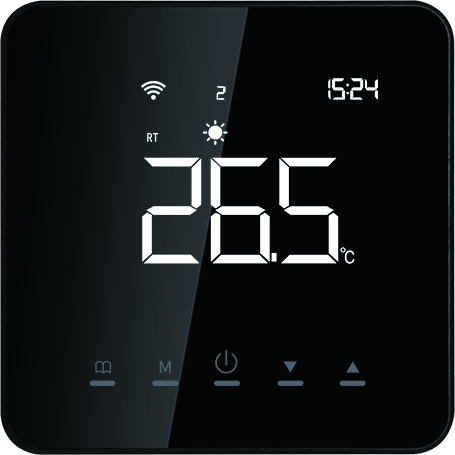
Black finish shown. Four housing colors available.
CONNECTION & TERMINALS
Use the drawing for the exact version supplied. These are the original European-configuration connection images provided for this product.
For compatible heating mats or cables, with the external floor sensor shown. Match the installed load to the supply voltage and output rating.
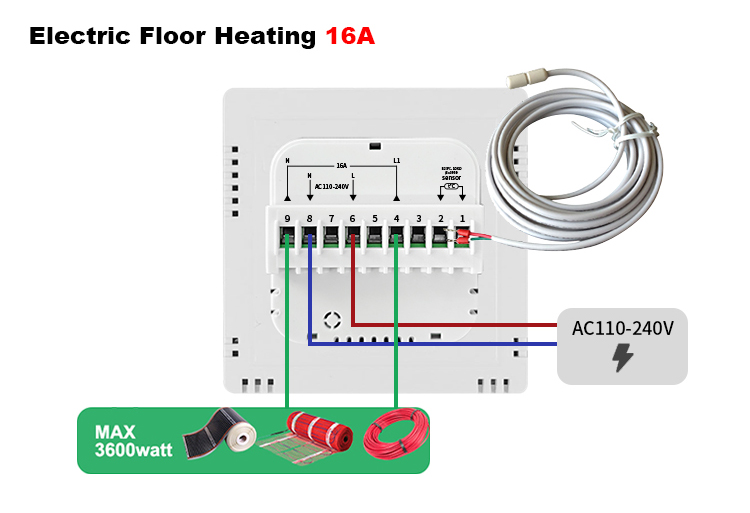
The 3600 W marking in the image is not a universal rating at every voltage. Verify load current at the actual supply voltage; higher loads need an appropriately designed external switching solution.
Isolate mains power. Wiring must be completed by a qualified installer using the supplied terminal labels and equipment instructions.
THERMOSTAT FEATURES
Read the room temperature and adjust the setpoint directly on the tempered-glass front.
The AE-5503D platform supports manual operation and weekly programming: four weekday periods and two off-day periods.
Power-off memory stores settings. Calibration and temperature limits help configure the thermostat for the installation.
Local functions are referenced to the AE-5503D platform manual. Confirm the supplied Matter firmware; local settings are not necessarily exposed in a Matter app.
APPLICATION SETTINGS
Measure the temperature at the thermostat for room comfort.
Use the specified external sensor when required by the heating design.
The platform supports combined sensor selection. Configure the floor-temperature warning limit for the floor finish and installation.
External sensor reference: NTC 10 kΩ at 25°C, β = 3950. Confirm the sensor supplied with your selected configuration.
SMART HOME SETUP
The current integration focuses on temperature and operating-mode control. Available modes and app layouts depend on the thermostat firmware and chosen platform.
Use the Matter setup code supplied with the thermostat and prepare the compatible controller required by your ecosystem.
Request the current ecosystem compatibility list and final sample specification. This page does not imply that all local functions are available in every Matter app.
AE-5503D platform specifications. The quotation and sample specification define the exact Matter version supplied.
| Series | AE-5503D · Matter edition |
|---|---|
| Application | Electric Underfloor Heating |
| Output selection | 16 A electric configuration |
| Supply | AC 110–240 V — per the supplied European-configuration wiring diagram |
| Temperature setting | 5–60°C; application and floor limits must be configured appropriately |
| Temperature accuracy | ±1°C |
| Ambient operating temperature | 0–45°C |
| Mounting-hole spacing | 60 mm |
| Construction | Tempered-glass front / PC housing |
| Housing colors | Black, White, Silver, Gold |
| External sensor reference | NTC 10 kΩ at 25°C, B3950; confirm sensor supplied with the selected configuration |
Supply and terminal arrangement follow the newer wiring drawings shown above. The ordered sample and product label define the final electrical configuration.
INSTALLER REFERENCE
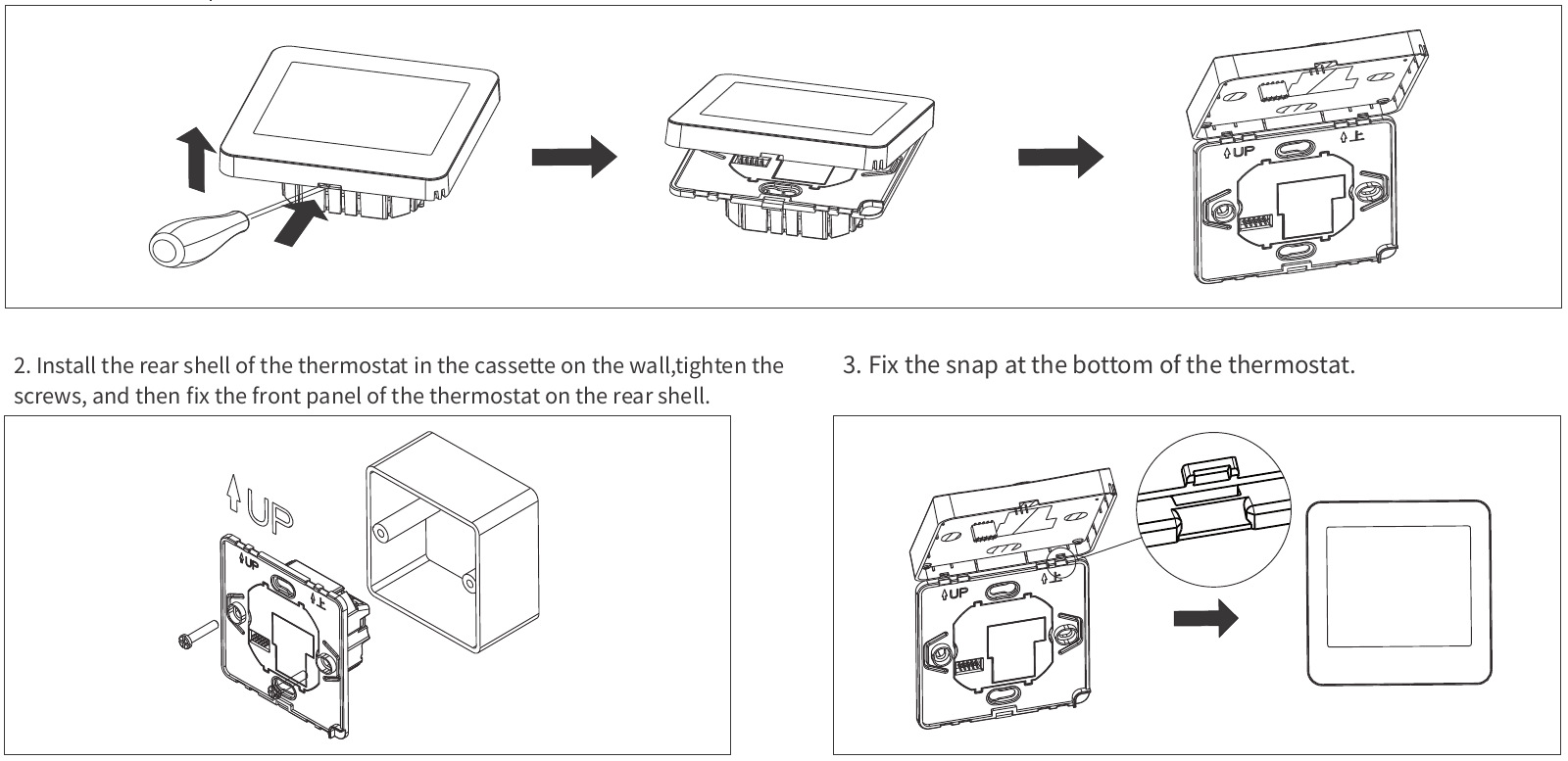
Switch off the supply and release the front panel as shown.
Follow the correct configuration drawing and secure the rear housing in the wall box.
Refit the front and lower clip. Restore power, configure the sensor and check heating operation before Matter pairing.
Check wall-box clearance and the mechanical drawing for the ordered version. The 60 mm figure is mounting-hole spacing, not the overall product size.
Choose the electric output configuration for the installed heating load. Confirm the external floor sensor and temperature limit for the floor finish. Loads exceeding the selected output rating require an appropriately designed external switching solution.
Please provide: total heating load, supply voltage, external sensor type and floor temperature limit, destination country, preferred ecosystem and quantity.
BUYER GUIDE
Use the diagram supplied for your ordered electric underfloor heating configuration. Thermostats with the same front appearance can have different outputs and terminal assignments.
No. Black, white, silver and gold are housing choices. Within the same heating configuration, hardware and software are the same.
No. Temperature and operating mode are the current integration focus. Local schedules, calibration, sensor choices and advanced settings must be checked on the supplied firmware.
Select the correct electrical output before ordering. Electric heating loads, hydronic actuators and boiler dry-contact inputs need different configurations.
Send the heating-system type, supply voltage, load or actuator/boiler specification, sensor requirements, destination country, preferred Matter ecosystem, color and quantity.
01 / AE-5503DFor hydronic floor heating projects using compatible actuators and control wiring.
Explore this thermostat →02 / AE-5503DFor electric heating mats and cables, with a configuration selected for the installed load and floor sensor.
Explore this thermostat →03 / AE-5503DFor compatible wall-mounted boiler heating systems, with the switching interface matched to the boiler.
Explore this thermostat →Discuss samples, color selection, branded packaging and your target-market requirements with ACMELEC.
Contact us about this thermostatPublished by ACMELEC / Nanjing Ikrey Network Technology Co., Ltd. · Updated .
Use the ordered product label, matching wiring diagram and sample specification to confirm the supplied version. Request the current firmware, tested ecosystem functions and finished-product certification record for your target market.
Samples, MOQ and OEM/ODM terms · Partner model and company reference